I recently wrote that one of the important differences between renting computing and owning it is the freedom to misuse the machine. When the hardware is yours, you can leave it running overnight, take it apart, connect it to something else, or attempt a project that is useful mainly because you find it interesting. This is what I meant.
I built a temperature-controlled 140 mm fan for an NVIDIA DGX Spark, then attached it with a 3D-printed mount whose arms wrap around the computer like the creature from Alien. I called it the Face Hugger Fan.
In my experience, the DGX Spark is a great tool to learn how to use local AI on a daily basis. It does get very, very hot at times depending on what you are doing. I had a few cases where it just decided to shut down because of that. This seems fixable.
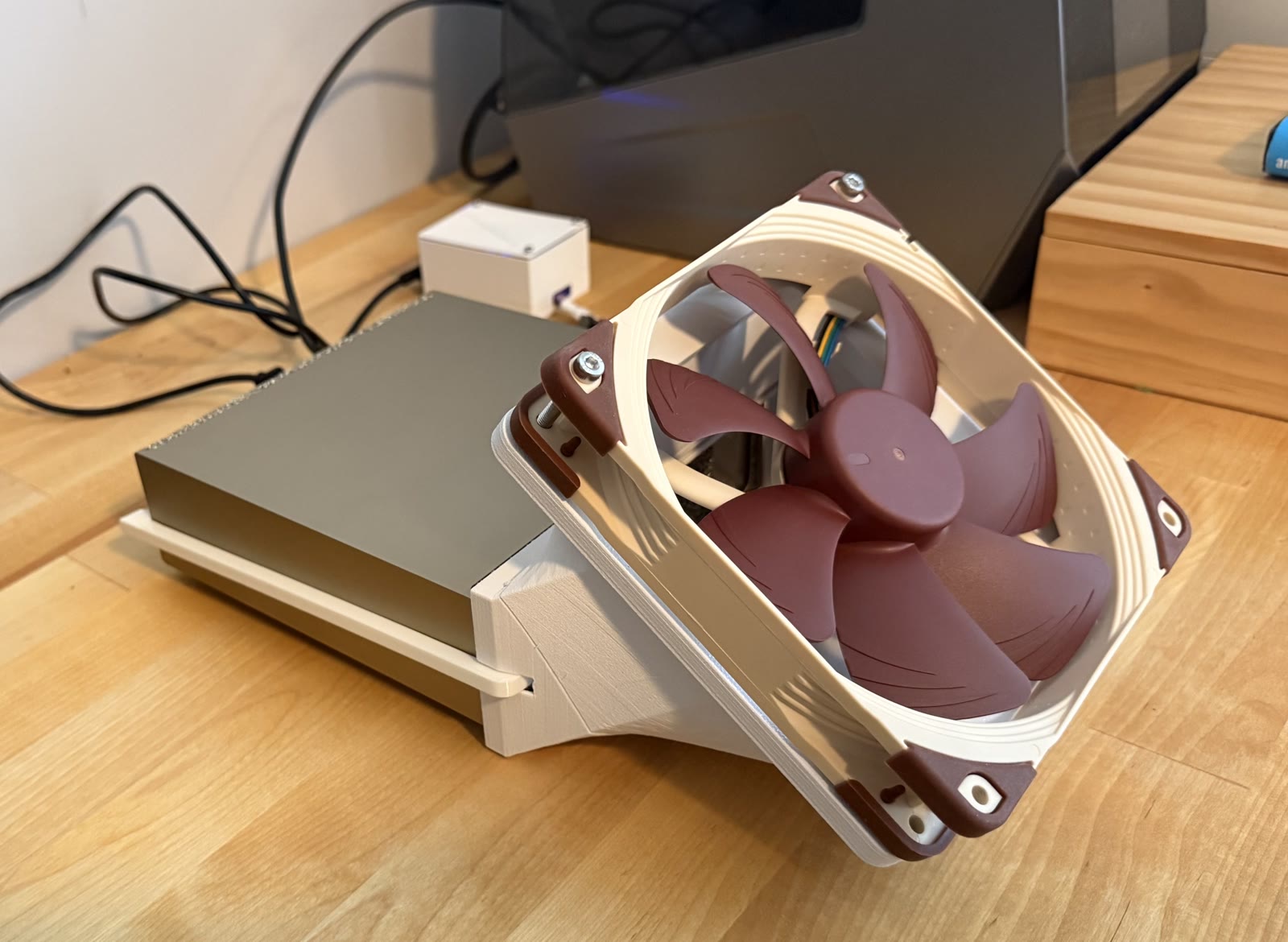
I will be the very first to say that my solution does not make the DGX Spark any prettier. It does reduce the temperature by 4-5C though.
The Physical Side of Local AI
Most conversations I hear about AI infrastructure quickly migrate to large infrastructure topics. We talk about model size, memory, tokens, inference speed, and all those other requirements for scaling. Local AI brings computing back into the physical world. It is great having a machine where I can put my cup on top to keep my coffee warm.
The DGX has heat, airflow, power limits, cables, noise, and a very real relationship with the temperature of the room. A long-running workload does generate a lot of heat. It is also a magical thing to it turning electricity into AI computation… and heat.
I should say that the DGX Spark already has its own internal thermal management. This project does not replace it, and I did not want to open or modify the device. The idea was simply to add external airflow when it was useful, without running a large fan at full speed all the time.
Of course, I could have pointed a desk fan at it and declared victory. I have followed that route in the past multiple times with crappy machines. I felt that the little DGX Spark deserved better.
Making a Fan More Complicated Than Necessary
The finished system uses a standard Noctua NF-A14 PWM fan, a Raspberry Pi Pico W, a small power converter, and two 3D-printed pieces that hold the assembly around the DGX Spark. The fan takes power from the DGX through USB, while the Pico controls its speed.
A small service on the DGX reads the computer’s CPU and GPU temperatures. Every few seconds, it sends those readings to the Pico, checks the temperature curve stored there, and renews the selected fan-speed command. At lower temperatures the fan can remain off automatically. As the machine gets warmer, the fan moves through progressively higher speeds until it reaches full output.
I also built a local dashboard showing the current temperatures, requested fan output, estimated speed, and 24 hours of history. The same dashboard can be used to change the temperature curve.

This is clearly more machinery than a switch requires. But the point was not only to make a fan spin. It was to make the accessory behave like part of the computer: quiet when it is not needed, observable when it is running, and predictable when something goes wrong.
That last part matters. The controller starts at full speed and returns to full speed if valid commands stop arriving. If the Wi-Fi connection disappears, the telemetry service fails, or the control loop goes stale, the safe response is to go for max airflow rather than less. It is a design choice. It makes me comfortable leaving it attached to an expensive computer.
The Result, With an Asterisk
The first tests produced encouraging results. The highest recorded GPU temperature was 10.0 °C lower with the external fan, and the highest CPU temperature was 14.9 °C lower. Temperature variation also fell for both processors.
The averages, however, were slightly higher during the fan run. That sounds contradictory until you remember that this was a practical before-and-after test, not a controlled laboratory benchmark… As you can probably tell, I am an engineer, not a scientist. The exact workload, ambient temperature, and conditions were not sufficiently documented to claim that the fan universally makes the machine cooler.
The evidence from my tests supports a conclusion: in this run, the fan reduced the peaks and made temperatures more stable.
Since this is an external fan, there are limits to how much gains in cooling could be achieved. Being honest about what the data does and does not prove is important. I am happy with these first results though.
The next useful step could be a repeatable workload, fixed sampling, recorded room conditions, and multiple alternating runs with and without the fan. That may sound excessive for a facehugger fan attached to a computer, but once you add a wifi dashboard to a fan being reasonable is not necessarily the place you end up.
What This Has to Do With AI
Very little, if AI is defined only as models and software. Quite a lot, if AI is also the changing relationship between people and computers.
In another post, The Price of Tinkering, I argued that local hardware matters because cheap failure creates a different kind of curiosity. A machine you own invites experiments that would be hard to justify against a usage meter. This project is a small example of that type of freedom.
There is something healthy about making advanced computing feel physical again. A local system teaches a lot and showcases the AI workflow with its requirements for electricity, silicon, cooling, software, and a long chain of engineering decisions. Sometimes the most useful improvement is not a better prompt or a larger model. Sometimes it is just airflow.
An Open Side Project
The complete project is available on GitHub. It includes the CircuitPython firmware, DGX telemetry service, dashboard, wiring guide, bill of materials, thermal results, tests, and printable STL files for the body and mounting arms. This project is open under the MIT license. You are free to use it at your own risk, and improve on this if you feel like it.
I have also shared the project on the NVIDIA Developer Forums for discussion with other DGX Spark users.
It is an experimental accessory, not an NVIDIA-supported modification, and anyone reproducing it should read the electrical and safety notes carefully. The fan motor uses 12 V, the controller does not, and confusing the two is an unusually fast way to make the project less fun.
It is nice that the DGX Spark is advertised as an AI supercomputer, yet progress can still be made with a fan, a microcontroller, a 3D printer, and the ability to create something slightly ridiculous.